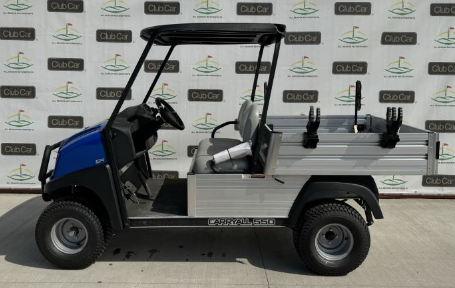
 Electric golf carts are no longer limited to golf courses. They are widely used in residential communities, resorts, campuses, and commercial spaces. Their quiet operation and eco friendly design make them a practical transportation solution. However, long term performance depends heavily on proper care and maintenance. Without a consistent routine, even the most reliable cart can lose efficiency over time.
This guide explains how to maintain electric golf carts effectively so they continue delivering smooth, dependable performance for years.
Why Regular Maintenance Matters
Electric golf carts rely on a combination of batteries, motors, wiring, and mechanical components. While they require less upkeep than gas powered vehicles, neglect can still lead to costly repairs and reduced lifespan.
Routine maintenance helps identify small issues before they become major problems. It also ensures consistent speed, improved battery life, and safer operation. Whether you recently explored electric golf carts for sale or have owned one for years, maintenance should always be a priority.
Battery Care Is the Foundation of Performance
The battery system is the most important component in an electric golf cart. Proper care directly impacts range, power, and longevity.
Charging habits play a major role. Always recharge the batteries after each use, even if the cart has only been driven for a short distance. Letting batteries remain partially discharged can shorten their lifespan.
Water levels must be monitored regularly. Batteries require distilled water to maintain proper function. Low water levels can cause internal damage and reduce efficiency. It is important to check levels after charging, not before.
Clean battery terminals frequently to prevent corrosion. A buildup of residue can interfere with electrical flow and lead to performance issues. Keeping connections clean ensures smooth energy transfer throughout the system.
Maintaining the Electrical System
Electric golf carts depend on a network of wires and connections that power every function. Over time, these components can wear out or loosen due to vibration and regular use.
Inspect wiring periodically for signs of damage or corrosion. Loose connections should be tightened carefully to avoid disruptions in power flow. If the cart experiences sudden power loss or inconsistent acceleration, it may indicate an electrical issue.
Controllers and solenoids also require attention. These parts regulate how electricity moves through the system. When they begin to fail, the cart may respond slowly or behave unpredictably. Addressing these concerns early helps prevent more complex repairs.
Tire Care for Smooth Operation
Tires influence how efficiently a golf cart moves. Poorly maintained tires can reduce battery performance and create safety concerns.
Check tire pressure regularly and keep it within recommended levels. Proper inflation reduces strain on the motor and helps the cart move more efficiently. Underinflated tires can cause uneven wear and reduce handling control.
Inspect the tread for wear and replace tires when necessary. Driving on worn tires affects traction and stability. Rotating tires occasionally can also extend their lifespan, especially for carts used frequently on uneven terrain.
Brake System Maintenance
Reliable brakes are essential for safe operation. Electric golf carts typically use mechanical braking systems, and some include regenerative braking features.
Pay attention to how the cart responds when stopping. Any delay or unusual noise should be addressed immediately. Brake pads and cables should be inspected regularly to ensure they are functioning properly.
Keeping the braking system in good condition not only improves safety but also enhances the overall driving experience.
Keeping the Motor in Top Condition
The motor is built for durability, but it still requires care to perform at its best. Dirt and debris can accumulate around the motor and affect efficiency.
Clean the motor area periodically to prevent buildup. Avoid exposing it to excessive moisture, as this can lead to damage. Listening for unusual sounds during operation can help identify issues early.
If the cart struggles with power or acceleration, a professional inspection may be necessary. Addressing motor issues promptly can prevent further complications.
Cleaning and Protecting the Cart
Regular cleaning helps preserve both the appearance and functionality of an electric golf cart. Dirt and grime can affect moving parts and lead to long term wear.
Wash the cart with mild soap and water, focusing on removing dirt from wheels, body panels, and undercarriage areas. Avoid using excessive water near electrical components.
Dry the cart thoroughly after cleaning to prevent rust and corrosion. Storing the cart in a covered space protects it from harsh weather conditions and extends its lifespan.
Routine Inspections for Preventive Care
Preventive maintenance is one of the most effective ways to keep a golf cart running smoothly. Regular inspections help identify potential issues before they escalate.
Check lights, switches, and accessories to ensure everything is working properly. Look for loose bolts or unusual vibrations during operation. These small details often indicate underlying problems that need attention.
Keeping a simple maintenance schedule can make a significant difference. Whether the cart is used daily or occasionally, consistent checks ensure reliable performance.
Proper Storage Techniques
Storage plays a key role in maintaining an electric golf cart. Exposure to extreme temperatures or moisture can negatively impact performance.
When the cart is not in use, store it in a dry and shaded area. If it will be unused for an extended period, fully charge the batteries beforehand. Using a maintenance charger can help preserve battery life during storage.
Covering the cart protects it from dust and environmental damage. Proper storage practices reduce wear and help maintain overall condition.
Driving Habits That Extend Lifespan
How a cart is driven has a direct impact on its longevity. Smooth and controlled driving reduces stress on the motor and battery system.
Avoid sudden acceleration and sharp braking. These actions consume more power and increase wear on key components. Driving at a steady pace helps maintain efficiency.
Be mindful of load capacity. Overloading the cart can strain the motor and reduce battery life. Using the cart within its intended limits ensures consistent performance.
When to Consult Professionals
While many maintenance tasks can be handled independently, some situations require professional expertise. Electrical issues, motor repairs, and complex diagnostics should be left to trained technicians.
Visiting experienced golf carts dealers near me can provide access to expert advice and reliable servicing. Professionals can identify issues that may not be visible during routine inspections and recommend effective solutions.
Regular professional maintenance complements daily care and helps extend the life of the cart.
Choosing Quality Parts and Accessories
Using high quality replacement parts is essential for maintaining performance. Low quality components may save money initially, but often lead to frequent issues.
When replacing batteries, tires, or electrical components, choose options that match the specifications of the cart. Consulting with experts or trusted golf carts dealers near me can help ensure compatibility and reliability.
Investing in quality parts reduces long term costs and improves overall performance.
Building a Long Lasting Maintenance Routine
Maintaining an electric golf cart is a combination of regular care, smart driving habits, and timely professional support. By focusing on battery health, electrical systems, tires, and routine inspections, owners can significantly extend the life of their carts.
Whether you are exploring electric golf carts for sale or looking to improve the performance of an existing vehicle, consistent maintenance is the key to success. A well maintained cart delivers reliable performance, improved efficiency, and a more enjoyable driving experience.
With the right approach, electric golf carts can remain dependable for years, providing both convenience and value in every use.